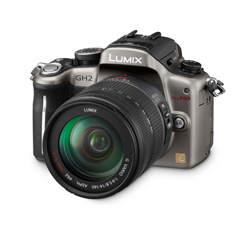
I really think that the GH2 recently announced by Panasonic can be THE digital Cinema camera to shoot on if you are on a budget. Having been recording to HDMI in recent years I can attest that the uncompressed HDMI feed of any camera is vastly superior to the internal codec.
It is still unclear at this time whether the HDMI feed is clean, degraded, frame rate manipulated or not. If it is an unfettered signal then this will be THE DSLR to own. Digital cinema will not be easier.
I have the GH1 and it is the most convenient camera to own I believe. I have the 5D as well and it is cumbersome to take on a trip. The GH1 has interchangeable lenses ( almost any lens ever made works becuase of the short flange distance – just need the right mount ) , small discrete size, large sensor for close to 35 mm depth of field and a great swivel screen.
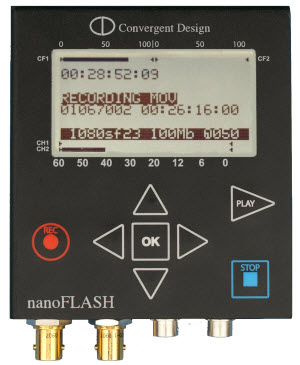
It has been turned into a beast with the hack but it still has a way to go as far as being visually lossless as I am used to. Next year I will be filming my first feature and I am keeping a close eye on this baby. I believe that Panasonic have hit a home run with this camera.BUT…………………. The PAL version it appears at this stage will not have 25p but 50i. Now if that is true then that sucks big time. The NTSC version may well have 24p and that means that that is the version I am likely to go for on release. 60i with embedded 24p is no problem for most NLEs or indeed HDMI capture rigs that have pulldown removal built in – like my nanoflash.
Panasonic may well have just come up with a camera that can make the independant film-maker truly BIGTIME. Hey Pana – want someone to test the GH2 for you in a music video set? He he he – one can dream.
Well done Panasonic – I have my eye on the AF 100 as well so things are hotting up………………oh yeah!!!!
Some of you may be aware that for over a couple of years now I been on the forefront of HDMI capture and attempting to make it easier to do in the field. Well I held off for a few months but last month I eventually succumbed and bought the Nanoflash from convergent design. Capable of recording to compact flash cards the Nanoflash is a dream for anybody wanting to enter the realm of high quality HDMI capture. Of course the product can also capture to HD-SDI. I have made myself a DIY battery that can last a whole day if need be.
The output file is either i-frame or longop – ( long group of pictures ) and I will be recording to 180 mbps longop which surpasses anything the DIY project I did can achieve. The data rate at 8 bit technically has more information than the film scan rate of cineform at 10 bit. This makes it perfect for consumer camcorders like the HFS10.
Have a look at what it looks like in action. Go to Vimeo, login and download the original to get a feel for the detail captured.I was blown away.
I did a few Cineform vs AVCHD comparisons a while back ( here and here ).I have also done an HDMI capture tutorial to help build a rig and highlight the benefits of bypassing in-camera compression to get a clean image from cheap camcorders.Now I have been asked again to do some kind of torture test.I have no time for that so I will just place some first generation files for all to see what the big fuss is all about.HDMI capture surpasses AVCHD in the areas of colour,sharpness and freedom from codec artifacts bla bla bla.Don’t believe – download my sample files below and try them – you will need the Cineform Codec which you can get here.
The proof is in the pudding so I have made available some first generation files for your perusal.Three of them are a comparison of the same scene shot simultaneously.One long AVCHD file and the two Cineform files – sorry – it was snowing here.The rest are well – hopefully a nice selection of different subjects that I hope will put this argument to bed.If you think AVCHD can look this good then sample these.As for me – I think the quality speaks for itself.These are large files so be patient when downloading.
Hope this helps some of you to ascertain the quality.I suggest that for the ones with cinemode (The flat/low contrast Canon in-camera setting) you take them into Cineform’s first light and play with them.Especially the horses in the field.Not the snow field….he he.You will be amazed at the leeway you have with a 10 bit file.It colour grades beautifully.Oh and yes – I know the HFS10 has aliasing and yes the start of each file has some wierd interlacing lines (because Cineform has to guess the cadence and it takes a second or two).A better camera would give better results………but come on – this is turning a relatively cheap consumer camera into an expensive one without forking out the thousands right………………………it’s still a consumer cam…..remember it’s only just on a grand now for an HFS10.
During my search for a solution for the dilemma of the poor codec implemented by Panasonic on the new Lumix GH1,( I tend to be rather particular about video quality ) I have discovered that there is a video on Panasonic’s own website that shows that the G1 (non- video) can possibly output live video out of the AV port.
Check this video of the little non-video G1 cam out guys…..the little brother of the Panasonic Lumix GH1.
1 minute 24 seconds.Did you see that????It is connected to an HDTV and I believe it may be via HDMI ( 3 minutes 21 seconds ).It may be composite but I don’t know as it is hard to make out in such a small video.It may well be SD or even HD.Either way – I went to my local Jessops ( a camera shop here in the UK ) to see if I could get it to output a live signal and guess what – nothing.Twice I have tried to do so but failed.But surely this means that the camera is capable of doing this as shown in this video but we know not how.There is no hiding it now is there?The G1 outputs live video…..but Pana may have disabled it for the rest of us.I can see why though – uncompressed HDMI on this little puppy would open up a whole new world of independent film-making for the rest of us.
Edit : Just discovered that it is actually the AV port and it is done by pressing the trash can button for a few seconds.
Seems like the camera outputs SD to an external monitor.That may not produce a bad picture but it is too small for HD production.Even if it output through the HDMI port it may just be a copy of the LCD display resolution.