GH2 Uncompressed HDMI. Fortune favours the brave
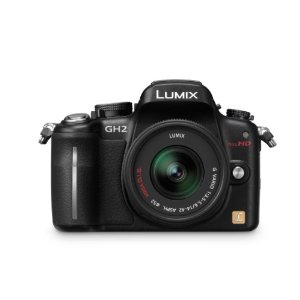
So get this – it’s not often that I get to rant on my blog but this time I think I am a little sad. Why – well Panasonic have just about made the best hybrid camera for about a grand that money can buy at this point in time and then ‘crippled’ it. I have just received a Japanese version of the GH2 and it is a wonderful camera. Well done Panasonic. It has amazing features. Buuuuuuuuuuuuuuut – the HDMI output however seems slightly crippled. An engineer says it is an incompatibility between 60 fps ( sensor readout ) and also the HDMI output 59.94 fps. What happens is the 60i only output changes the order of the fields every few seconds so a proper simple capture and pulldown of the HDMI signal cannot be done. It can be recorded but it will have interlacing periodically. Like every 8 and/or 17 seconds. The cadence keeps changing in other words. Check this thread to find out what I am referrring to.
Every small chip consumer camcorder I have owned has done HDMI right from the get go. Now these DSLRs come along and all of a sudden the SAME companies that did it so well before seem to choke on it as if it is a new unique problem. We have heard all sorts of reasons for two years now, from processing power to, overheating, to frame rate incompatibilities. Bla bla bla. These guys are too smart to screw this up. It’s mainly annoying for long form stuff but for seven second takes it may be fine after treating the footage carefully. Cineform again does an amazing job at trying to remove pulldown but obviously cannot predict the inconsistent cadence.
As far as their reasoning goes, I say I think it’s baloney – the difference between the frame rates is so small that this cannot account for what is going on. 1 frame difference every 1000 frames? Hang no. I think ( and I could be way off base here ) it is a deliberate sabotage of the HDMI output to protect their higher end product the AF100. What’s wrong with that? Nothing – they are a business and they want to make lots of money no doubt but IMHO whether they make lots of money by selling millions of GH2s or AF100s is immaterial. It still sort of ends up in the same pot right? Panasonic – you may be missing an opportunity to totally dominate this space. Canon cleaned you up in round one of the DSLRs wars and you can perhaps knock em out in round two. But you will have to be brave and bold and you know what they say – fortune favours the brave. Uncripple this thing please, pretty please – you know it makes business sense.
The GH2 has already caused a stir among videographers and film makers because it has improved low light performance over the GH1, uncompressed HDMI for monitoring, plus all the features that made the Gh1 great. Swivel LCD, compactness, wide range of interchangebale lenses, improved video codec, touch screen that allows touch focus bla bla bala. It can go where other camers cannot go such as in areas where a bigger camera demands a filming permit. It is therefore a legitimate tool for professionals to use right? It produces a wonderful image that has to be seen to be appreciated especially the live HDMI.
But for any wannabe bottom feeder cinematographer, uncompromised uncompressed HDMI would have made this a must have camera in 2011. Not because it will be a front runner – oh no – the AF100, RED Epic, Scarlet, Sony’s F3 with the other large sensor offering for mid year and Canon’s offering ( when they come to the party ) are the professional’s choice. Oh no – my rant is because the same people who buy an AF100 may well buy a GH2 as they share the same technology as far as lens mounts go. They are not enemies within the same company – they are relatives – get it? The two cameras compliment each other on just about every level except the codec. The GH2 has the Extra tele feature that the AF100 cannot have becasue of the OLPF. If the GH2 had uncompromised HDMI it would allow many people to get one or two AF100s and a handful of GH2s and have a fully compatible high quality camera portfolio from the SAME company. They will have the same investment in lenses and accessories as well.
What has Panasonic got to lose? Sales of the AF100? Hang no – professionals know the difference and have unique needs such as ND filters, dedicated audio, HD-SDI etc.
How many people bought the GH1 AFTER the hack – the price went UP on EBAY. I would have loved to be in the board room meeting after that one.
Engineer for GH1 – Sir some hacker called Vitaliy has hacked our firmware and given it a higher bit rate after we deliberately gave it the worst codec of any EVIL camera. I mean boss we tried really hard to make it’s picture look really bad and don’t know why all these stupid film makers are moaning about mud – what mud – we call it mush and it took a lot of thought to make such a beautiful sensor produce such crappy video? We just left the B -frames out – he he he we got them there – very clever. I’m so proud of that one. For crying out loud it’s a CONSUMER camera boss why all the fuss – shouldn’t they just buy the professional tools? I hate that tester13 guys after all…….grrrrrrr
Boss – That Vitaliy must be stopped. I don’t care if we have sold more cameras than before, we cannot have rogue hackers improving our products. We are here to cripple them not liberate them. Make sure that the next firmware update cannot be downloaded anywhere or hacked – close that hole – enrypt it or whatever you can do. You hear me? In fact we’ll even screw anyone who’s hacked camera comes in for repair…..muwaaaha ha ha . That will teach those stupid customers of ours who buy our products and then screw with them after we have sold , even if we have their money – SUCKERS!!!! Our message must be loud and clear – don’t mess with our products buyers – we didn’t give give them the permission to mess with our Cameras!!! Even if they don’t care about the warranty we might cause mass panic in the masses.
Marketing guy – but boss isn’t it better for business if we sell lots and lots of cameras, whatever their flavour. I mean we are here to make our cameras look the best, RED are way ahead of anyone anyway and Canon have…….
Boss – shut up!!Don’t mention the C word. By the way – we are producing this new Af100 and I don’t want the new GH2 camera to compete with it, we have to learn from the past..
Marketing guy – ( shakes his head )
Engineer I know boss, we’ll give them uncompressed HDMI and cripple the hang out of it so that they cannot record it. They have been asking for it so they can monitor and we can give it to them but also prevent them from using a recorder. Voila – kill two birds with one stone. Panasonic gives – Panasonic takes away. Nanoflash, KI Pro, Atomos ninja, Or Blackmagic Design stuff, in fact Boss, we bought every one just to test it and I can confirm that the signal cannot be recorded properly. Even Bloom says it’s impossible on his blog so now the secret’s out.
Boss – Good one. I can rest easy now, good one. We cannot have these low end film makers having access to this kind of quality. Incredulous – they can get Scarlet for that. They will have to man up to get the Scarlet or get our AF100. The soccer mom camera now is the GH2. Nothing more, nothing less. And make sure that in the GH series adverts you have lots of moms taking photos.Okay
Marketing guy – as you wish boss. Can I just say one more thing…….
Boss – ( waves hand as if to say proceed )
Marketing guy – what if Canon add uncompromised HDMI to their next camera, will we give them a firmware update? And what about PAL 25 p?
Boss Firmware updates? Are you mad, We leave that feature for the next season’s cameras. Since when does a Japanese camera maker IMPROVE a new camera after it has been bought……
Marketing guy Eerrrrrr Canon have done so sir and they couldn’t get rid of the 5D fast enough
Boss Shuuuut up about Canon. In fact your Fired.
So…how many people want a simple HDMI feed to record. Just a few thousand filmakers who may or may not have bought an AF100. Will they lose sales of the AF100? Don’t know. Could they lose potential customers to Canon if they offer that feature without the other DSLR issues – perhaps. I have an eye on a Scarlet fixed or Canon offering if/when it hits the shores as my A cam.
What do they have to gain……….millions of dollars!!!!!!!!! If they sold four times as many GH2s as AF100s to filmakers would that be worse maths?
They make a natural pairing and the GH2 can reach in places where perhaps the AF100 may not be favoured for example – as a crash cam. But a cheaper £ 1000 is more or less disposable for some on bigger budgets. But how do we get them to look similiar as the technology in the AF100 produces a better flavour of AVCHD as Mr Barry Green suggests? Or what to do if the AF100 originated material is recorded mainly on an off board recorder such as the Nanoflash. Bigger quality difference there now.
It is understandable that Panasonic do not want the AF100 to be cannibalised – cool. Except the competition in 2011 won’t be between an AF100 and a GH2 – it will be with every large sensor alternative on the market from Sony, RED, Canon etc. So what am I saying – perhaps Panasonic in their panaroia have tried too hard to protect a camera that will do well anyway in it’s price point and have missed the opportunity to clean up in one sense. I own one already and love it. It just would havebeen nice if they weren’t so protective. Fortune favours the brave. Rant over and happy filming…….Come on Vitaliy………where do I donate??????
Oh – I also just read that the GH2 out-resolves the AF100………now that sucks if you shelled out 4 grand to be out-resolved by a consumer camera.